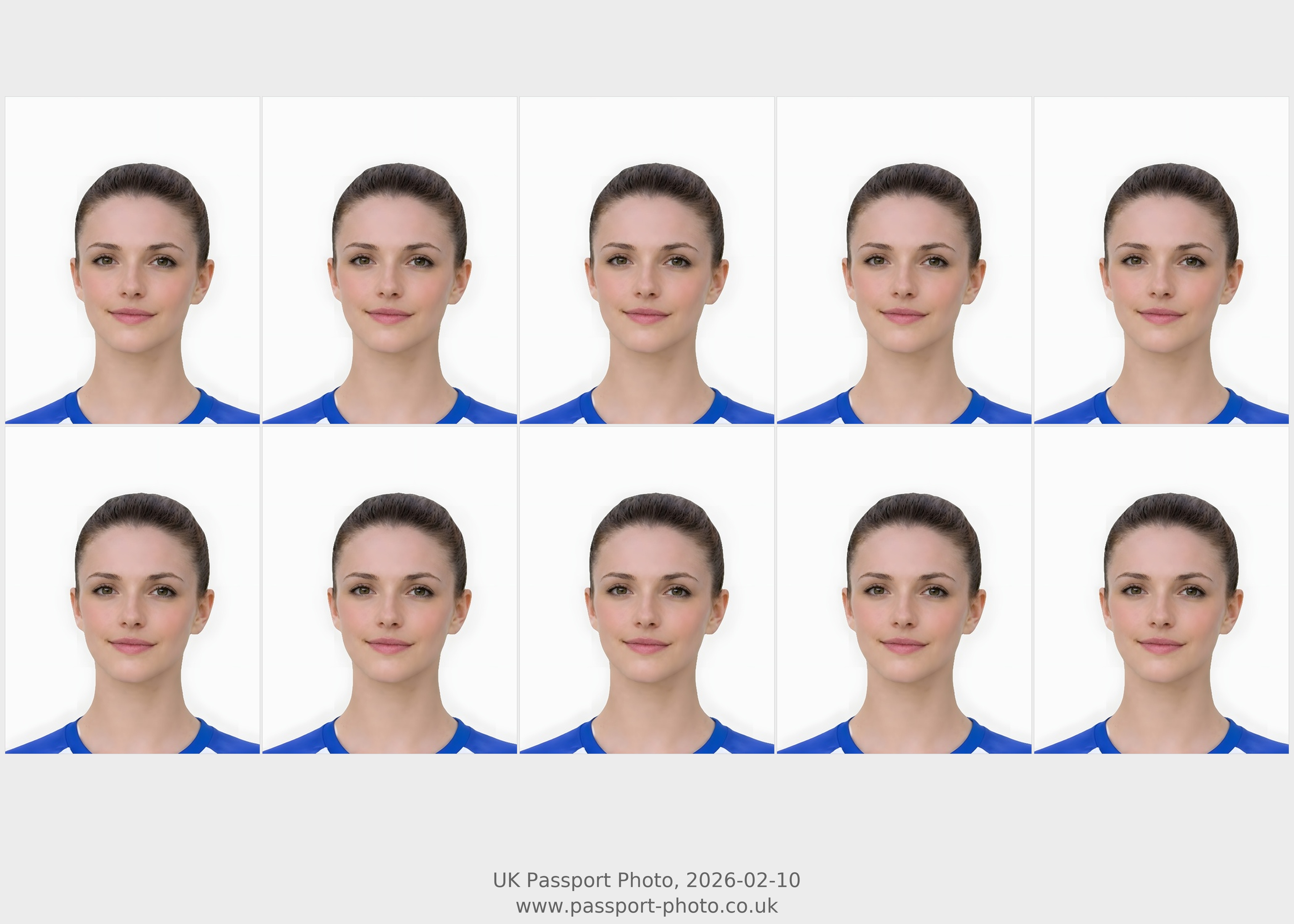
Quick checklist
Use this short list to decide whether the current photo is worth continuing with.
- Check the prepared image before printing the sheet.
- Avoid printing a source photo that is blurred, too dark, or cropped too tightly.
- Use the checker if the image looks close but you are not sure it is worth keeping.
- Use the digital or code pages instead if the application is online-only.
Step by step
Follow this sequence to keep the workflow clear and reduce avoidable mistakes.
- 1
Start with the main UK passport photo service when you are not sure what
Start with the main UK passport photo service when you are not sure what output you need.
- 2
Use digital upload for online application forms that accept a file
Use digital upload for online application forms that accept a file.
- 3
Use photo code only when the application explicitly asks for one
Use photo code only when the application explicitly asks for one.
- 4
Use printable output when you are following a paper-photo workflow
Use printable output when you are following a paper-photo workflow.
Common mistakes
These are the errors most likely to waste time or trigger a preventable rejection.
- Do not print a direct-upload file unless it is prepared for print.
- Do not stretch or crop the sheet in printer settings.
- Use the final prepared image as the source for any print sheet.
- Check whether the application still needs physical photos.
When printable output is the right choice
Choose print-ready only when the route needs paper photos.
- Use printable output for paper-photo workflows or when you need a physical sheet.
- Use digital output instead for upload-first online applications.
- Check crop and background before printing anything.
- Compare total route cost before choosing a local print stop.
Passport photo printing online: what this page provides
The online part is preparing the print-ready sheet before you print it at home or through a shop.
- Start with a prepared passport photo rather than sending an unverified source image straight to print.
- Use the print-ready sheet when the next step is physical printing.
- Use the cheap-print guide when the remaining decision is where to print the sheet.
- Use the size guide if the blocker is 35x45mm dimensions, head size, or crop balance.
What a print-ready sheet is for
The printable route should be clear about the difference between preparing a photo and physically printing it.
- The sheet is intended for users who need paper photos after the image has been prepared.
- It should be printed at the correct size and on suitable photo paper through a home or shop printer.
- It is not the right choice when the application only asks for a digital upload or photo code.
- Use the size guide if the question is about 35x45mm framing rather than the output format.
Before you print
Printing makes crop and head-size mistakes more obvious, so preview quality matters.
- Check the prepared image before printing the sheet.
- Avoid printing a source photo that is blurred, too dark, or cropped too tightly.
- Use the checker if the image looks close but you are not sure it is worth keeping.
- Use the digital or code pages instead if the application is online-only.
Home printing or shop printing?
The sheet can support either route, but the photo quality still matters before paper is used.
- Home printing can be convenient if you have suitable photo paper and enough control over print scaling.
- Shop printing can be useful when you want more reliable paper and printer quality.
- Do not let the printer scale or crop the sheet unexpectedly.
- If the image itself is weak, fix or retake before comparing print options.
Printable passport photo vs cheap shop print
Keyword-gap and cost queries often mix printable output with cheap local printing. This page should separate sheet preparation from the place you print it.
- Use this page when you need the passport photo arranged into a print-ready sheet.
- Use the cheap-print guide when the remaining decision is where to print that sheet.
- Use local shop or supermarket printing only after the sheet and source image already look usable.
- Do not choose printable output when the application only needs a direct digital upload or photo code.
How printable output fits the UK photo route
This page should support paper-photo intent without stealing digital or code traffic.
- Start with the main UK passport photo service when you are not sure what output you need.
- Use digital upload for online application forms that accept a file.
- Use photo code only when the application explicitly asks for one.
- Use printable output when you are following a paper-photo workflow.
What this printable route does not do
Print pages need clear boundaries because users can confuse preparation, printing, and official application handling.
- This route prepares a print-ready sheet; it does not physically print or post photos.
- It does not replace checking printer scaling, paper quality, or the application route.
- It is not the right output when the application asks for a digital upload or photo code.
- The preview and quality guidance help screen the image before printing, but official application decisions remain outside the service.
Print-ready route acceptance checklist
Use this checklist before choosing printable output.
- The application, appointment, postal route, or backup process genuinely needs paper photos.
- The prepared image looks sharp, centred, and correctly framed before it is placed on a sheet.
- You can print at the correct scale on suitable photo paper without the printer cropping or stretching the sheet.
- You are not choosing print-ready output when the application only asks for digital upload or a photo code.
When to switch away from print-ready
A print page should stop users buying paper output for a digital-only route.
- Switch to digital upload when the application gives you a direct file upload field.
- Switch to photo code when the application specifically asks for a code handoff.
- Switch to the size page when the issue is 35x45mm crop or head size rather than output format.
- Switch to the checker or retake guide when the image is too weak to print cleanly.
Print-ready trust checklist before checkout
Printable output is useful only when the user understands that the service prepares the sheet, while printing and official application decisions remain separate.
- Confirm that the route genuinely needs paper photos or a print-ready sheet.
- Preview the prepared image before choosing printable output, because print makes crop and blur issues harder to ignore.
- Check printer scaling and paper quality before using the sheet for a paper-photo route.
- Read service standards, refund/remake review, and help pages before payment if output responsibilities are unclear.
- Do not use this route when the application asks for direct digital upload or a passport photo code.
Printable passport photo versus digital output
This page should own print-ready sheet intent without cannibalising digital or code pages.
- Use printable when you need paper photos or a print sheet.
- Use digital when the application asks for file upload.
- Use code when the application asks for a code handoff.
- Use checker before printing if the source image may be weak.
Before printing a passport photo
Print intent still depends on photo quality and route fit.
- Check crop and head position before printing.
- Check background and shadow issues before printing.
- Use a prepared sheet rather than resizing an unreviewed selfie.
- Keep the print route separate from digital-only applications.
Printable passport photo: only choose print when paper is required
Some ranking terms mix online and print intent. This page should own paper-photo intent without confusing digital users.
- Use printable output when the route requires physical photos or a paper form.
- Do not choose print-ready output if the application only needs a digital upload file.
- Print quality still depends on paper, printer settings and final cutting.
- Start from the same well-framed source photo before creating a print sheet.
Print from a prepared photo, not a fresh crop
This reinforces consistency across preview, download and print outputs.
- The print sheet should be based on the already prepared passport-style photo.
- Do not crop the head again after the final photo has been prepared.
- Check the digital preview first so the printed result has the same framing.
- Use print guidance only after the photo itself is acceptable.
Printable passport photo UK: choose this only when paper output is needed
Printable-photo searches are commercial, but the page must stop users buying a print sheet when their route actually needs upload or code.
- Use this route when you need a print-ready sheet for paper-photo output.
- Do not use a print sheet when the application asks for one digital upload file.
- Do not use a print sheet when the application asks for a passport photo code.
- Check the source photo before checkout because a print layout cannot fix blur, glare, bad background, or tight crop.
Before printing: source photo, layout, and scale
This gives practical value to print-intent users and reduces failed local printing attempts.
- Start from the final prepared photo, not a screenshot or compressed copy.
- Print the sheet at the intended scale and avoid fit-to-page changes that resize the photos.
- Do not crop the sheet again after download.
- If using a shop printer, make sure the file is printed without automatic enlargement or trimming.
When to use digital, code, or print-ready output
This section reduces cannibalisation between commercial output pages.
- Use digital output for application routes that ask for an upload file.
- Use photo code guidance only when the route asks for a code.
- Use print-ready output when paper photos are needed.
- Use the output comparison page if you are unsure which route applies.
Printable intent: prepare a print-ready sheet from a usable source photo
This page should capture print-sheet searches without competing with digital upload or code routes.
- Use print-ready output when the user needs a file to print rather than a direct upload.
- The source photo still needs suitable face, background and crop quality.
- Do not use print-ready output if the passport application route specifically asks for a photo code.
- Check the photo first if the user is unsure whether the source image is usable.
Print-ready limits users should understand
Clear limits increase trust and reduce mismatched purchases.
- A print sheet does not fix a source photo with hidden eyes, heavy blur or cropped hair.
- Printing quality depends on the printer, paper and print settings used after download.
- If the user needs an online application upload, the digital route may be a better fit.
- If the route needs a code, the code route is separate from print-ready output.
Printable passport photo: only choose print when paper is needed
Printing-related terms have commercial value, but users should not choose print if their application needs a digital file or code.
- Choose print-ready output when paper photos are required.
- Choose digital output when the application asks for a file upload.
- Choose code output only when the application asks for a photo code.
- Check the prepared preview before printing.
Before printing a passport photo sheet
This improves print-page usefulness and reduces failed outputs.
- Confirm the source photo is sharp and correctly framed.
- Use a suitable printer or print service.
- Do not stretch, crop or scale the sheet after download.
- Keep digital and print routes separate in your decision.
Printable route: use it only when paper output is actually needed
Print-related queries can convert, but they need clear separation from digital upload and photo-code routes.
- Use printable output when the user needs paper copies or a print-ready sheet.
- Do not choose print output for a digital-only upload route.
- Start with a suitable source photo before creating a printable sheet.
- Check print route needs before paying for the wrong output.
Printable passport photo: use only when paper is needed
Print intent can convert, but it must not cannibalise digital upload or photo-code pages.
- Choose print-ready output only if the application route needs physical photos.
- Use digital upload if the route asks for an online file.
- Use code guidance if the route asks for a passport photo code.
- Check the preview first so you do not print a weak source image.
Before printing the sheet
This adds practical value for users comparing print routes.
- Use the final print-ready file, not the original source photo.
- Avoid printer scaling that changes the photo size.
- Use suitable paper and check the print is sharp.
- Do not crop each tile again after the sheet is generated.
When print-ready is the wrong product
Clear product boundaries improve trust and reduce refunds.
- The application asks for digital upload only.
- The user needs a photo code rather than physical prints.
- The source photo has blur, glare, or hidden face areas.
- The user cannot print at the correct scale.
Search opportunity: passport photo printing online
Semrush shows print-intent searches ranking low. This page should own online printable-sheet intent without mixing it with direct digital upload or code routes.
- Use this page when the user needs a print-ready sheet or paper-photo route.
- Do not use this route when the application accepts a direct digital upload file.
- Do not use this route when the application asks for a passport photo code.
- Use print-cost and where-to-print guidance when the remaining question is where to physically print the sheet.
Printable output decision before payment
Print pages convert better when users understand whether paper output is actually needed.
- Choose printable output for paper handling, appointments, postal backup, or local printing.
- Choose digital output when the application is upload-first.
- Choose code output only when the application asks for a code handoff.
- Use the checker first if the source photo might need a retake before becoming printable.
Print-ready trust checks
A print-ready page should explain what the user receives and what still depends on the source photo or printer.
- The prepared photo still needs suitable crop, background, lighting, and face visibility.
- The print sheet should be generated from the prepared photo, not a weak screenshot or compressed copy.
- Physical print quality can still depend on the printer, paper, and scaling settings used after download.
- Support and refund/remake review pages explain service boundaries before checkout.
Print passport photo online: when this route fits
The query “print passport photo online” should resolve to the printable route, not a new duplicate page.
- Use this route when paper photos are required.
- Use digital upload when the application asks for a file.
- Use photo code only when requested.
- Print at the correct scale after using a print-ready output.
Avoid print-route mistakes
Print-intent searches often fail because users print the wrong file or scale.
- Do not print a direct-upload file unless it is prepared for print.
- Do not stretch or crop the sheet in printer settings.
- Use the final prepared image as the source for any print sheet.
- Check whether the application still needs physical photos.
Verified post-purchase feedbackPublic customer feedback
Real ratings from completed orders, shown only when the customer allowed public display.
A clearer review summary for high-intent visitors who want fast proof before checkout.
4.7
Excellent
Based on 7 public reviews
★★★★★
These comments come from completed orders where the customer allowed public display.
Digital Photo + Photo Code + Print Sheet Useful next routes
Passport photo searches often mix requirements, checker, digital upload, code, and privacy questions. These related routes help you choose the right next step without relying on a government affiliation claim.