Digital Photo + Photo Code + Print Sheet
Complete package with print-ready files
£6.99
- HD digital file (JPEG/PNG)
- UK digital photo code
- Print-ready sheet download
- Home or shop printing
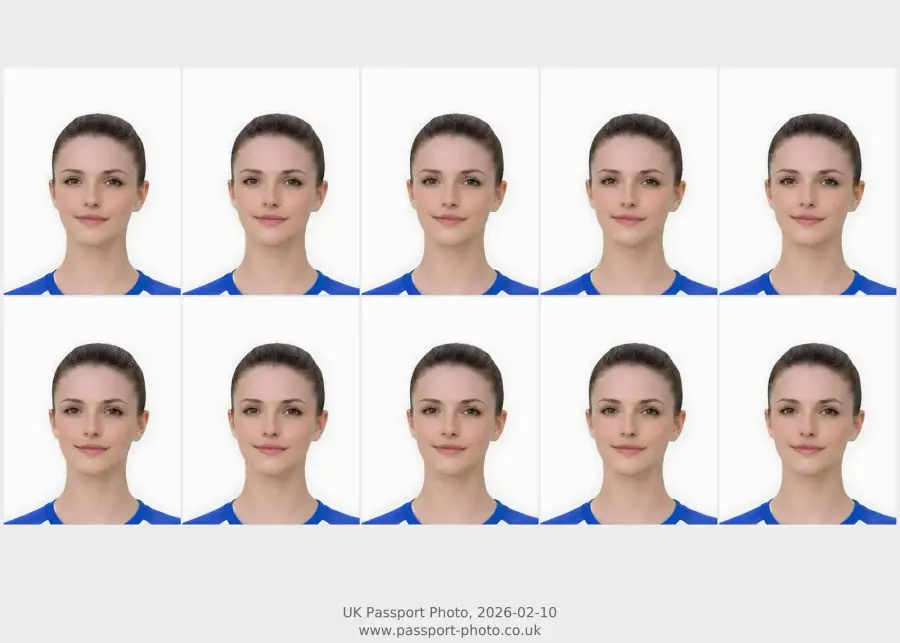
Use this route when you need a print-ready passport photo sheet for home or shop printing, rather than a digital-only upload file or photo-code handoff.
A printable passport photo UK route is for users who need a print-ready sheet after the photo is prepared. It is different from direct digital upload or photo code.
Print-ready route for users who need paper passport photos, with preview before checkout and clear support, privacy, and refund links.
Related guidance: digital vs printed passport photo · places to print passport photos · UK passport photo size · head size rejection guide · passport photo cost UK
Complete package with print-ready files
Passport-Photo.co.uk is an independent commercial service. It is not GOV.UK or HM Passport Office, and the preview step is designed to help you check the result before choosing a paid output.
Support route before and after checkout: support@passport-photo.co.uk. Use the help page if your question is about upload, package choice, download, photo code, print sheet, or refund review.
Use this short list to decide whether the current photo is worth continuing with.
Follow this sequence to keep the workflow clear and reduce avoidable mistakes.
The print sheet should be based on the already prepared passport-style photo.
Do not crop the head again after the final photo has been prepared.
Check the digital preview first so the printed result has the same framing.
Use print guidance only after the photo itself is acceptable.
These are the errors most likely to waste time or trigger a preventable rejection.
Choose print-ready only when the route needs paper photos.
The printable route should be clear about the difference between preparing a photo and physically printing it.
The sheet can support either route, but the photo quality still matters before paper is used.
Print pages need clear boundaries because users can confuse preparation, printing, and official application handling.
A print page should stop users buying paper output for a digital-only route.
Printing problems often come from resizing the already prepared image.
Passport-Photo.co.uk is an independent service. Use these primary sources to verify the relevant passport-photo rules or information rights. Linking to them does not imply government endorsement.
Only if your route needs paper photos. Many online applications use a digital file or code instead.
You can use a print-ready sheet for home or shop printing if the paper route is the one you need.
No. Online printing intent usually means preparing a printable sheet for paper output. A digital passport photo is for direct online upload.
Use home printing only if you can control photo paper and scaling. Otherwise, use a shop print route after the sheet is ready.
No. A printable sheet is for paper-photo use. A digital photo is for upload-first online routes.
Check crop, head size, sharpness, background, and face visibility before printing, because paper output makes framing mistakes easier to notice.
No. This route prepares a print-ready sheet. You still need to print it yourself or use a suitable print provider.
Usually no. Use digital upload or photo code depending on the application wording, and choose printable output only when paper photos are needed.
It can be, if the photo is already prepared correctly and the printer does not crop or scale the sheet. Compare cheap print options only after the sheet looks usable.
Check that you really need paper photos, the preview looks sharp and correctly framed, and you can print the sheet at the correct scale on suitable photo paper.
Yes, if you choose a print-ready output and print it without unwanted scaling or cropping. Use digital upload instead if the application does not need paper photos.
No. Printable output is for paper-photo routes. Digital upload is for application routes that accept an image file directly.
Only if paper photos are genuinely useful. If the route is direct upload or photo code, choose that output instead.
You can prepare a print-ready output online, then print it at the correct scale using a suitable printer or photo service.
No. A print-ready output is prepared for paper photos, while a digital upload file is prepared for online upload.
Use it when you need to print a physical passport-style photo. If an online application asks for a digital upload or a photo code, use the matching digital route instead.
Yes. Borderless, fit-to-page, or automatic crop settings can alter the final size. Use the prepared sheet as supplied and avoid extra cropping.
No. A printable sheet is for paper photos. A digital upload route usually needs a file or code instead.
No. Check the photo first, then prepare or print the final sheet only if paper photos are needed.
Only if it is prepared at the correct size and layout for printing. A direct-upload file is not always a print-ready sheet.
No. A printable photo is prepared for physical printing, while a digital passport photo is prepared for online upload.
Not directly. A passport photo code is a separate route. Use a code-specific workflow if your application asks for a code.
Use the upload flow when you already have a source image, or keep exploring the guides if you still need to fix the setup first.